Snapping Receipts
Can you snap any receipts with Fetch? How many receipts can you scan on Fetch?
- You can snap up to 35 receipts on a 7-day rolling period on Fetch.
- Fetch attempts to scan as many receipts as possible since we want you to be rewarded for your shopping. As long as your receipt is NOT one of the following, it will be scannable:
- Return receipts
- Utility & Medical bills/invoices, and prescription refill slips
- Movie/Concert/Experience tickets
- Airline tickets and baggage receipt tags
- Receipts from returning an item
- ATM and wire transfer transactions
- Take out food slips that do not specifically detail where they are from
How old can receipts be to scan with Fetch?
Physical receipts must be snapped within 14 days of the checkout date listed on them. Receipts that are older than 14 days can not be processed for points.
Will Fetch detect fake receipts?
We have our own fraud detection team that detects fake receipts. Check out some of the funniest fake receipts we’ve caught.
How do I scan online receipts? Connecting your email and retailer accounts and scanning for eReceipts.
In order to get credit for digital receipts that are sent to your email after an online transaction, you’ll need to use our eReceipt feature. With this feature, you can connect your Fetch account to your email inbox and Amazon account and earn credit for eligible online purchases.
**We are unable to accept photo snaps of eReceipts that are printed out on printer paper or that are taken from digital screens.**
To connect eReceipts on your eligible Fetch Account, please ensure your app is updated to the latest version of Fetch, then follow these steps:
With eReceipts, you can earn points for eligible online purchases by linking Fetch to your email and other online retailer accounts.
Before continuing, please ensure you're using the latest version of Fetch.
Then follow these steps:
- Go to your Account tab.
- Select eReceipts.
- Choose the accounts you'd like to connect.
- Follow on-screen directions to connect eligible retailer accounts.
- Your Amazon account must have an associated email address.
For email accounts, connect a supported account that receives eReceipts.
Once your accounts are connected, tap the orange snap button, then the blue eReceipt button. You'll earn points on eligible purchases from your connected accounts.
What does Fetch do with your receipts?
Fetch uses the receipts you snap to reward you with points towards free gift cards and other rewards. Fetch also uses those receipts to help CPG, Retailers, and Restaurants understand what people are purchasing and when. Simply put, Fetch is a safe and fun way to make sure people are rewarded for the shopping they are already doing!
Referring Friends
How to enter a referral code on Fetch? How do I use a referral code on Fetch?
- When signing up for the application, a prompt will appear asking if you'd like to enter a referral code:
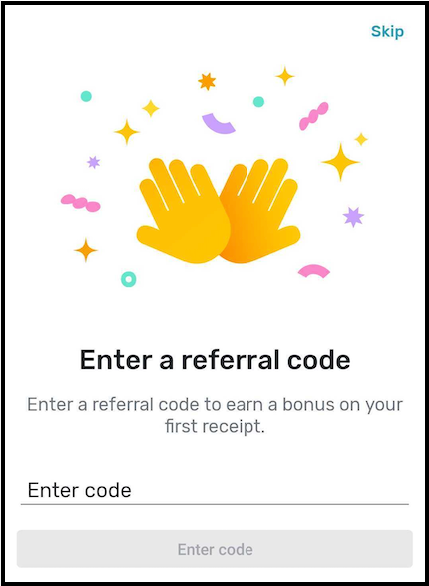
- If you skipped this chance, you can enter a referral code later on by tapping on the Me tab and selecting Refer a friend. It is important to note that you must enter the referral code before the first receipt is snapped or scanned. If the first receipt is already snapped or scanned, a referral code is no longer able to be entered.
- Even if a link is used to download the app, the referral code may need to be manually entered. If you are unable to enter a code from receiving a referral link, it means the code was automatically entered, and you may snap your first eligible receipt to receive the referral points.
- The points for entering a referral code will appear in the point breakdown of the very first receipt you snap successfully.
How to Refer a Friend to Fetch:
- To refer a friend, all you have to do is open your Fetch app, press the “account” tab in the bottom right of your screen, and choose “Refer a friend” on the following page.
- This will take you to your referral code, which you can share via text, email, or your preferred app. There’s even a pre-written message ready to go!
Rewards
How Do I Redeem Fetch Points?
Step 1:
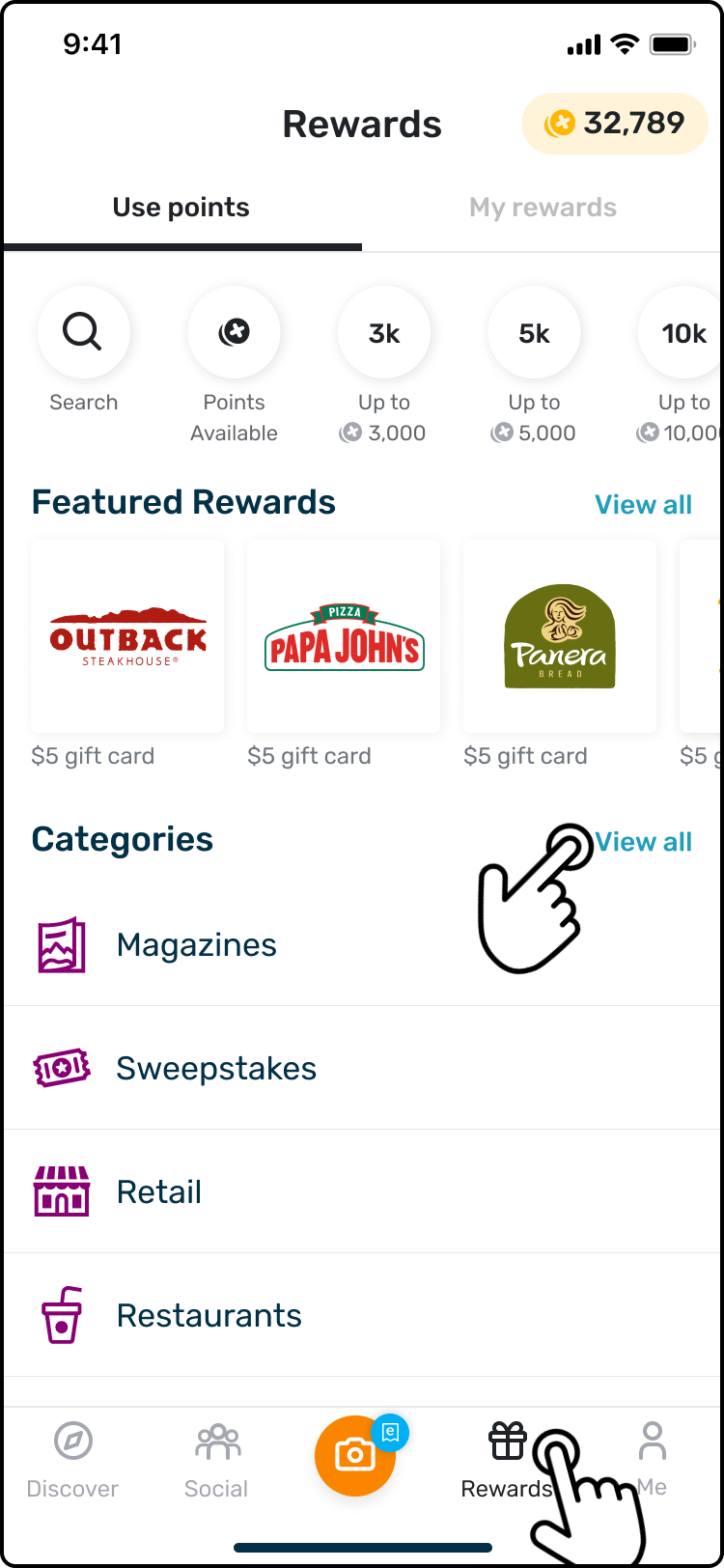
Tap the Rewards tab located at the bottom of the screen and search for a reward within the Categories, or by using the search field that will appear after tapping View All.
Step 2:
Once the reward you'd like to redeem is found, tap on the monetary value you'd like to go with and make sure you have enough points for it.
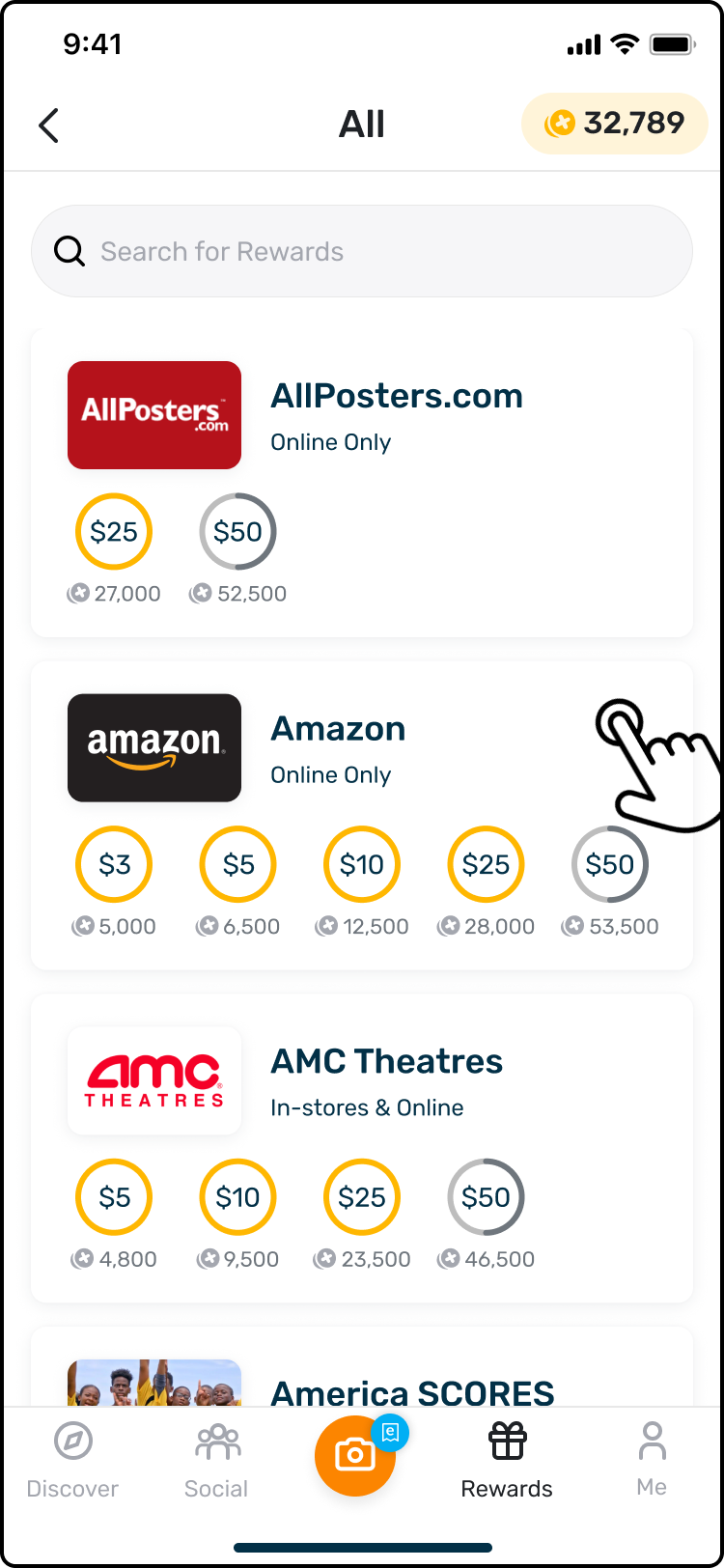
- A minimum of 3,000 points are needed to redeem most rewards. If you have enough points for a monetary value, it will be circled in orange.
- Please note that if this is your first redemption, or if you have not used 3,000 or more points in the past to redeem a reward, only $10, $25, and $50 rewards will be available for you to redeem. Once you redeem a reward worth $10, $25, or $50, you will have the opportunity to redeem $3 and $5 rewards on all redemptions after that!
Step 3:
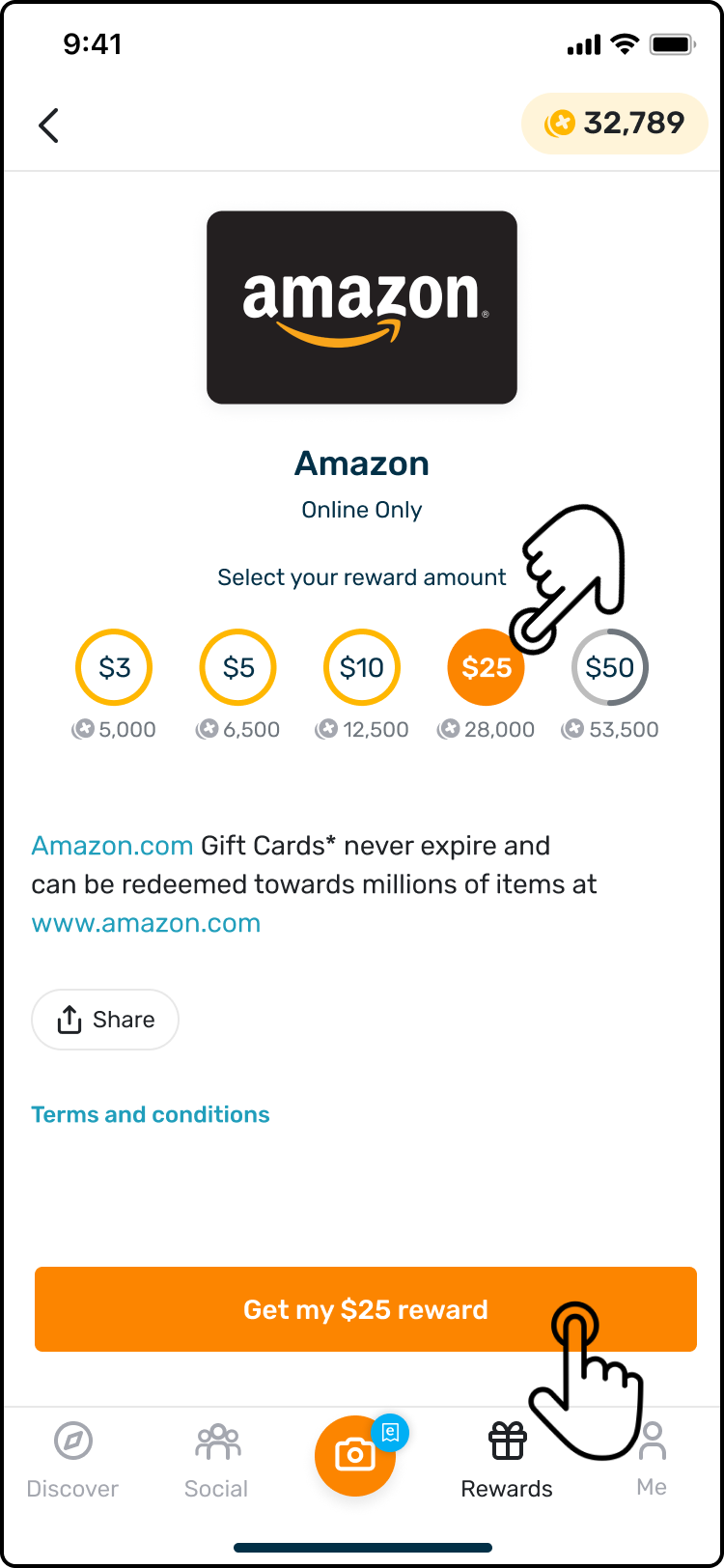
Click the "Get My Reward" button at the bottom of the screen while on the reward you wish to redeem. A second message will appear asking you to confirm that the selected reward is correct, and if it is, you can select “Use points for reward.”
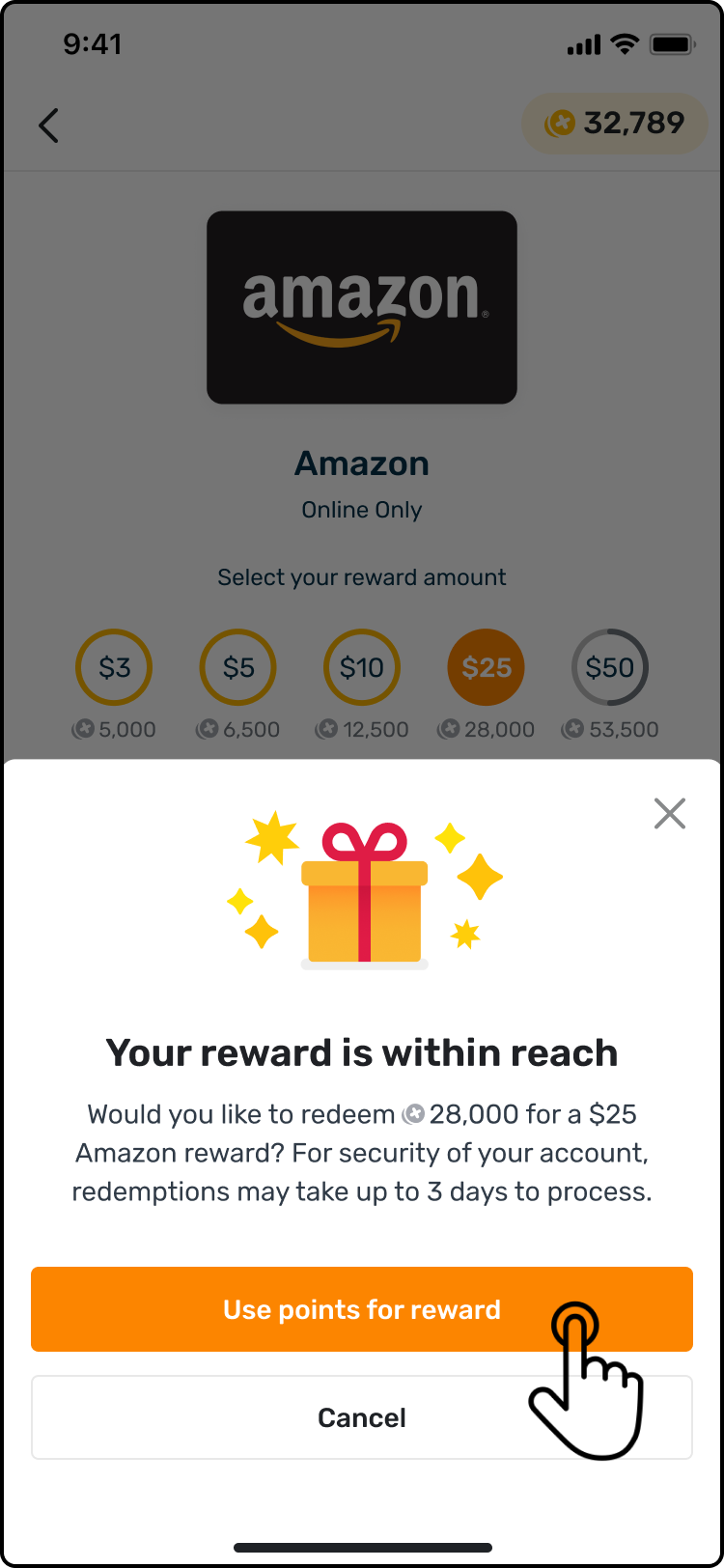
- You will also notice a message in the confirmation box that says, "For the security of your account, redemptions may take up to 3 days to process." As an extra precaution, your reward may require additional time to process. For more information, you can check out this article: 3-Day Reward Redemption Delay.
Step 4:
After confirming the selection, your reward will begin to process.
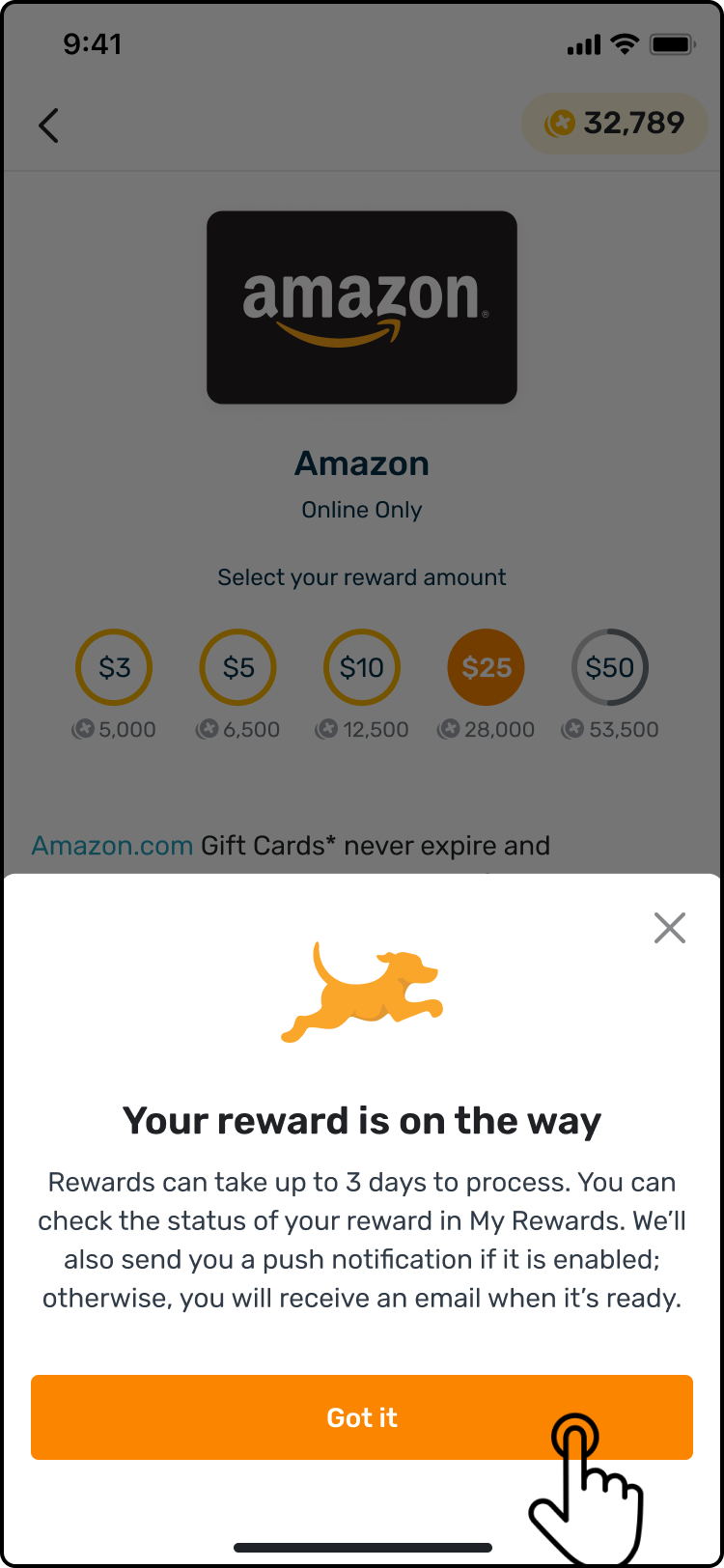
Step 5:
Once it is finished processing, you will receive a notification saying your reward is ready, at which point you can go to your My rewards section of the Rewards tab and find your reward there.
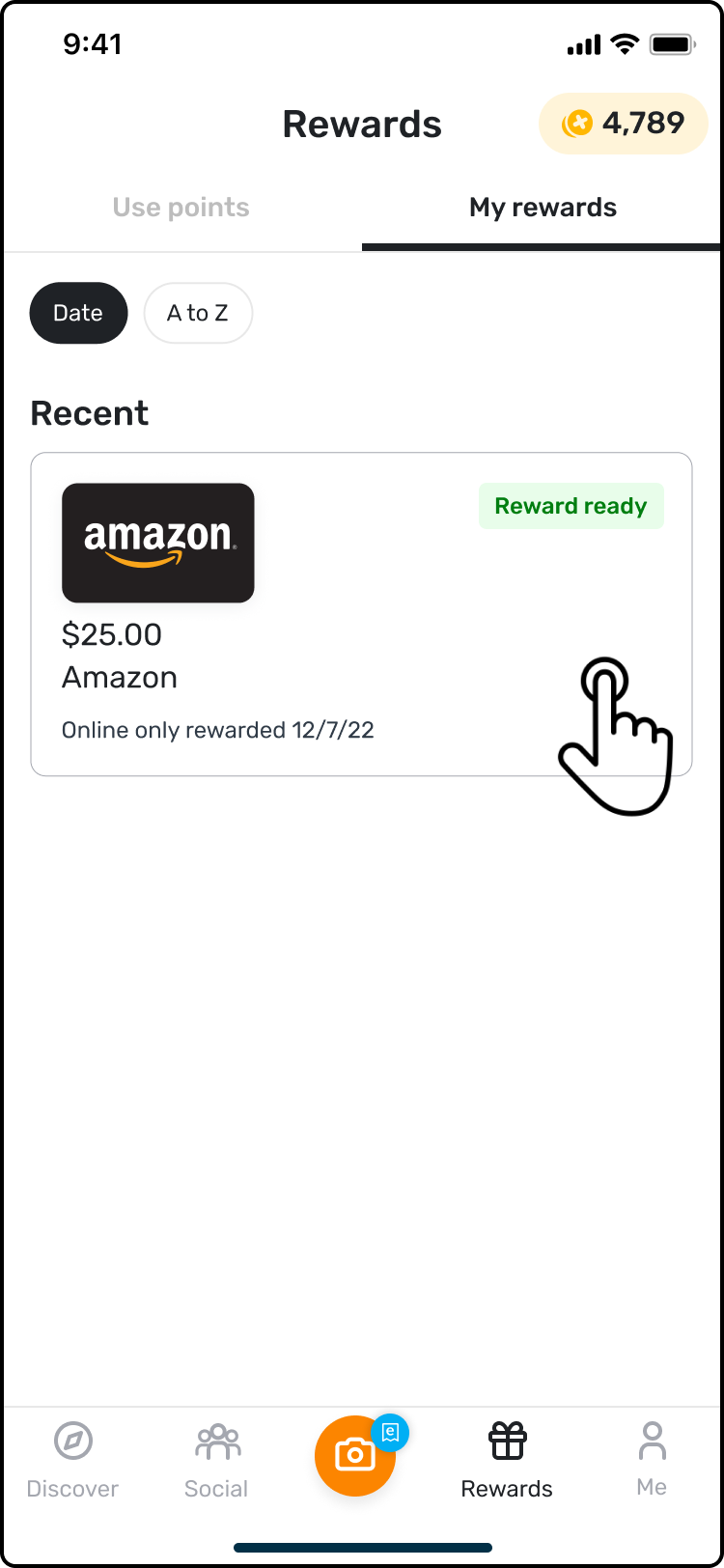
Step 6:
Select the reward that you redeemed and follow the instructions to finish activating the reward through the associated vendor/company. The gift card won’t be complete/active until you finish this step.
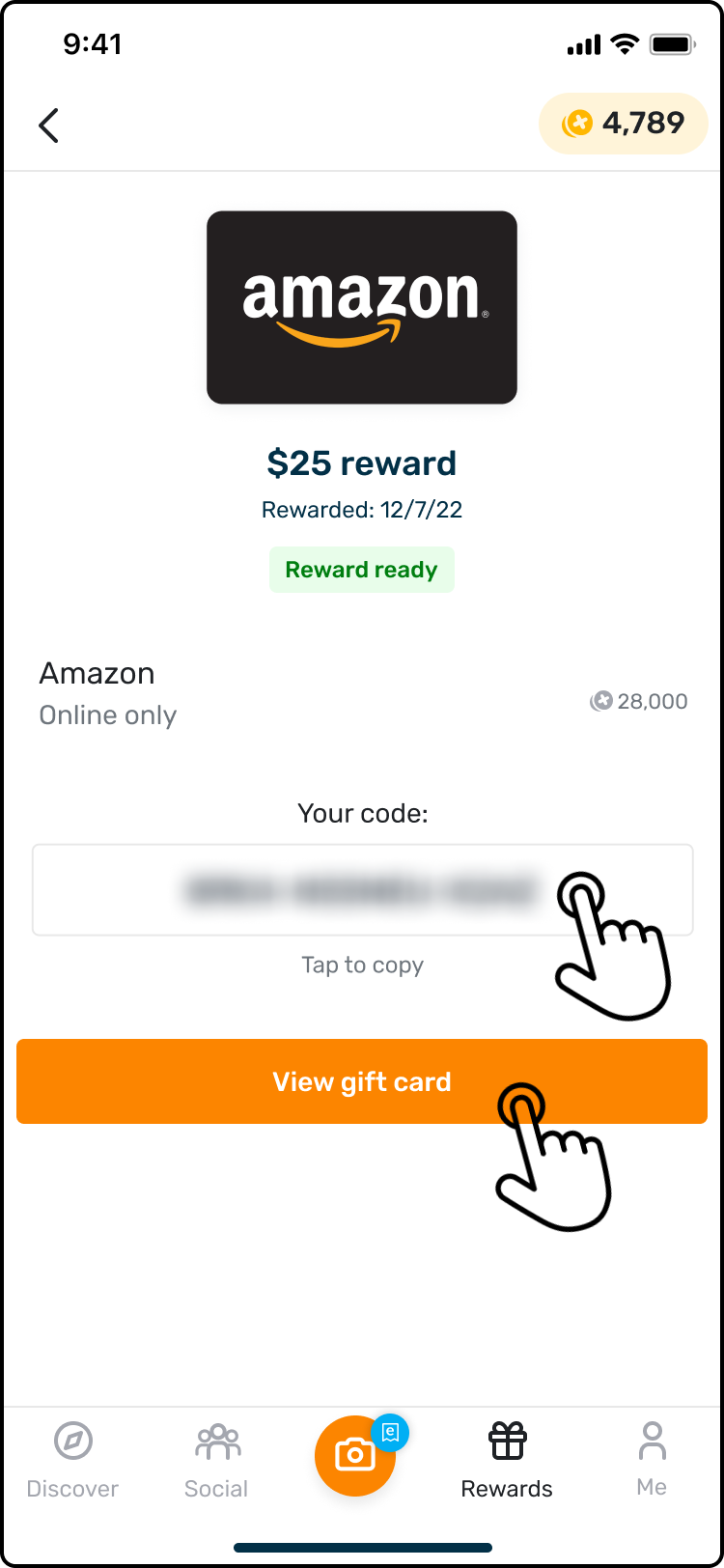
- Please note that some rewards, such as the Amazon reward in the example pictured above, will require you to enter a security code to get the reward code. For more information on this, please see this article: Rewards That Require Security Codes.
Enjoy your reward!
How Are Fetch Gift Cards Delivered?
The rewards can differ, but the vast majority are in electronic form, meaning you can access them through your phone. For more information on redeeming a certain reward, please select the reward you are interested in redeeming.
How long does it take to get gift cards from Fetch?
- A reward redemption can take extra time to process for a variety of reasons that mainly center around the security of your Fetch account. At most, a reward can take up to 72 hours to process.
- More information on the status of your reward can be found by going to the Rewards tab and selecting My Rewards where you will find your reward, the status of it, and the date & time when processing started for it.
My Fetch Account
Do Fetch Points Expire?
If your Fetch account is inactive for 90 days, the points earned on the account will expire. Inactive status means there have been no receipt submissions, reward redemptions, or GoodRx uses on the Fetch account within that 90-day time period. Fetch will notify users via the email address on the account and by text message before points expire.
As long as you are either submitting receipts, redeeming points, or using your Fetch GoodRx information, you can save up as many points as you'd like for as long as you'd like! Points will never be removed unless they expire or are used for a reward.
How To Reactivate Fetch Account? Why is my Fetch account inactive?
If you go more than 90 days with no activity your Fetch account may become inactive. To reactivate your Fetch account, all you need to do is login to the Fetch app, and scan a receipt.
Fetch Company Information
How Does Fetch Make Money?
How does Fetch work / How Do You Earn Points with Fetch?
Fetch gives you points for shopping and submitting your receipts with the app. You can then use those points to redeem gift cards from a wide variety of your favorite retailers and restaurants! For additional information on how to get started, check out some of the articles below:
What countries is Fetch available in?
Currently, Fetch is only available to shoppers in the United States.
What is Fetch?
Fetch is a mobile application that allows you to snap your grocery, shopping & restaurant receipts and lets you earn gift cards and rewards for your purchases!
Who owns Fetch?
Fetch is a privately owned company founded in Madison, WI.
Where is Fetch located?
Fetch has offices in Chicago, Madison, New York, and Birmingham!
Where Can I Download Fetch?
You can download Fetch on either the iOS App Store or the Google Play Store!
Is Fetch safe?
Fetch is 100% safe to use. All you are doing with Fetch is getting rewarded for the shopping you are already doing, no credit card is needed, just sign up with a phone number and you’re good to start earning free gift cards! Learn more about Fetch safety.
Who is Wes on Fetch?
Wes Schroll is the founder and CEO of Fetch, and he is everyone's first friend on the Social tab of the Fetch app! If you want to learn more about Wes, follow his LinkedIn, his Instagram, or his Twitter!